Lumen Pages · WordPress plugin · v1.1.2
One template in.
A draft page per term out.
v1.1.2 · free · no cap, no licence key, no checkoutA small WordPress plugin for the boring part of local SEO: you write the title and body once with a {term} placeholder, paste your list of terms, and it creates one draft page for each. However many you paste — v1.0.1 removed the per-run cap and the licence key that used to lift it. It does not write your content, and it never publishes anything for you.
No email, no account, no licence key. Plugins → Add New → Upload Plugin. GPL-2.0-or-later, with the licence text in the zip — read every line before you run it.
Check you got the same bytes:
shasum -a 256 lumen-pages.zip should print 148fc75ffcb3e5ff3fcb2d0c41e03425ed060bcfb42289b47092cf466cf3440b, which is also served on its own at /plugin/lumen-pages.zip.sha256.Prefer to pin this exact build rather than follow the current one? /plugin/lumen-pages-1.1.2.zip Every release, with its changelog, size and checksum, is listed at /plugin/versions — the plugin makes no update check, so that page is how you find out a new version exists.
The readme that ships inside the zip is also served on its own, if you want the changelog and the pre-publish checklist before you download anything: /plugin/lumen-pages-readme.txt
Questions before you install? Talk to a real person — one person reads every message.
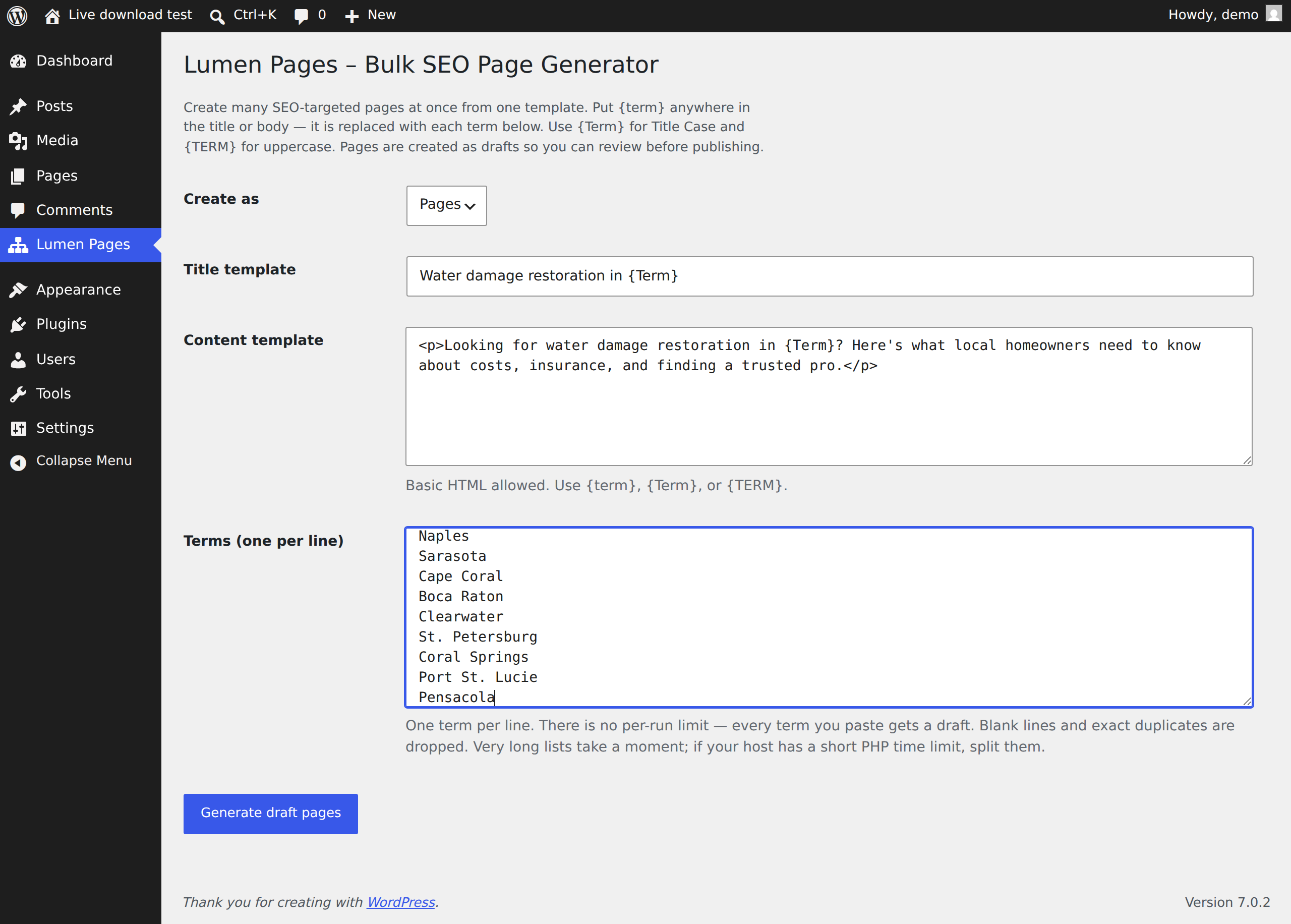
What you actually get
It builds the drafts. You make each page worth publishing.
Straight about this up front, because it is the one thing that decides whether the plugin helps you or wastes your afternoon: Lumen Pages drafts the shell of each page — the title and the body you templated, with the term filled in. That is the tedious part, and you do not need a developer to do it. But the shell is not a finished page. Every draft in a run starts out near-identical to its neighbours apart from the place name, and a folder of near-identical pages is exactly what search engines discount as thin or doorway content. It does not write your content, and it never publishes anything for you — both on purpose.
What the plugin does
- The plugin does this: Swaps your term into the title and body template
- The plugin does this: Creates one draft page or post per term, with no per-run cap
- The plugin does this: Drops blanks, collapses same-title terms, skips a page that already exists
- The plugin does this: Leaves everything a draft — nothing goes live on its own
What is still your job, or a writer’s
- Still your job: Writing what is actually true and specific about each place
- Still your job: A real local fact, a cost range with its source, detail a resident would know
- Still your job: Making every page meaningfully different before you publish it
- Still your job: Deleting a draft you cannot make genuinely different — a legitimate outcome of a run
If you were sold on “you don’t need a developer,” that part is true — and it is only the first half. The plugin removes the typing; it does not remove the writing. There is a full pre-publish checklist in the “Will this get me penalised for spam?” question further down, and the same checklist ships inside the zip.
How it works
Three fields and a button. That is the entire product.
Install it
Download the zip, then in wp-admin go Plugins → Add New → Upload Plugin → Choose File → Install Now → Activate. It then appears as a top-level “Lumen Pages” item in the sidebar — not under Tools or Settings — and as a “Generate” link on its own row on the Plugins screen. Needs WordPress 6.0 or newer and PHP 7.4 or newer; both floors are declared in the plugin header, so WordPress will refuse to activate it rather than half-work.
Write the template once
A title line and a body block, with {term} wherever the term belongs. {Term} gives you Title Case, {TERM} gives you uppercase. Basic HTML is allowed in the body. As of 1.0.3 the rule is the one the plugin itself prints, word for word: {Term} adds capitals to a word that has none and leaves a word you capitalised yourself alone: miami becomes Miami, while McAllen, DeLand, O’Fallon and HVAC come out exactly as you typed them. Two consequences worth knowing before you paste: a term typed all in lower case has no internal capital to recover (mcallen becomes “Mcallen”), and a term pasted as MIAMI now stays MIAMI. Type each term the way you want it printed.
Paste your terms
One per line — cities, suburbs, service keywords, whatever you're targeting. Blank lines are dropped, two terms that would produce the same page title make one page, and a term whose page already exists is skipped rather than duplicated. Every remaining term gets a page: there is no per-run limit and nothing to unlock. As of 1.1.0 a line can carry more than a term: name your columns (say “price, landmark”) and separate the values with a tab or a pipe — Plano, TX | 1,900 to 6,400 | Legacy West — and {price} and {landmark} work anywhere {term} does. That is the difference between fifteen pages that differ in a noun and fifteen that differ in what they say.
Review the drafts
Every page is created as a draft, in Pages or Posts. Nothing goes live until you open it and publish it — which is also where you add the local detail that makes the page worth having.
A list to paste, if you want to see a real run first.
1.1.2 ships examples/us-metros.txt in the zip: the 91 metro areas restorationanswers.com publishes water-damage cost pages for, one per line, in the form “City, ST”. It was derived from that site’s own public sitemap on 2026-07-30, so the count is checkable — count the water-damage-restoration-cost- entries in https://restorationanswers.com/sitemap.xml.
It is an example input, not a data product: not a complete list of US metros, not ranked, not scored, and not the reason to install this. One entry is spelled McAllen rather than Mcallen, on purpose — it is the exact case {Term} exists to protect, so pasting the file as-is demonstrates the rule instead of describing it.
Not built. Listed here so you can stop looking for it.
An earlier version of this page advertised several of the items below as shipped features. They were not, and are not. If any of them is what you came for, Lumen Pages is not it.
- Not included: Run-state memory — the plugin keeps no record of past runs. Since 1.0.2 it does check whether a page with the same title already exists and skips it, so a repeat run no longer duplicates; but it cannot show you which terms you have covered, and if you renamed or deleted those pages it will create them again
- Not included: CSV or spreadsheet FILE import — there is no file picker and no column mapper. 1.1.0 does let you paste spreadsheet columns straight into the terms box (separated by a tab or a pipe) and name them, which is the part people were actually asking for; uploading a .csv is still not built. For what it is worth, CSV import is not in page-generator’s free tier either; it is listed under its Pro features (checked 2026-07-30)
- Not included: Scheduled or drip publishing — it creates drafts and stops
- Not included: A one-click monetization flip / bulk CTA rewriting — no CTA code exists in the plugin
- Not included: IndexNow or any search-engine ping
- Not included: Junk-slug guards — 1.1.0 adds an optional slug template, but nothing inspects the result: a template that produces a bad slug produces a bad slug, and WordPress's own uniqueness suffix (-2, -3) is the only thing standing between two rows that resolve the same
- Not included: Multi-project support
- Not included: AI-written or otherwise unique per-page content — every draft is the same template, filled
- Not included: FAQ schema, JSON-LD or data tables — the body is exactly the HTML you type
- Not included: Featured images — nothing is set, uploaded or sourced. Some newer bulk generators bundle a stock image per page; this does not, and a page with a generic stock photo on it is not more differentiated than one without
- Not included: Auto-updates — there is no update channel, self-hosted or otherwise
- Not included: A WordPress.org listing — v1.0.4 is eligible to be filed, but the submission has not been filed yet
Proof
14 terms in, 14 drafts out, nothing published.
The screenshot below is the zip on this page, installed on a throwaway WordPress 7.0.2 site on 2026-07-30 and run once with 14 Florida city names. 14 is deliberate: it is more than the 10-page limit v1.0.0 enforced, so the count in it is the evidence the cap is gone. The admin screen further up this page is a different, older capture — it was shot from v1.0.1 and the version in its own footer says so. Read it as a layout reference, not as a capture of 1.1.2; its caption lists exactly what has changed since. Both captures are unretouched, including the parts that are inconvenient.
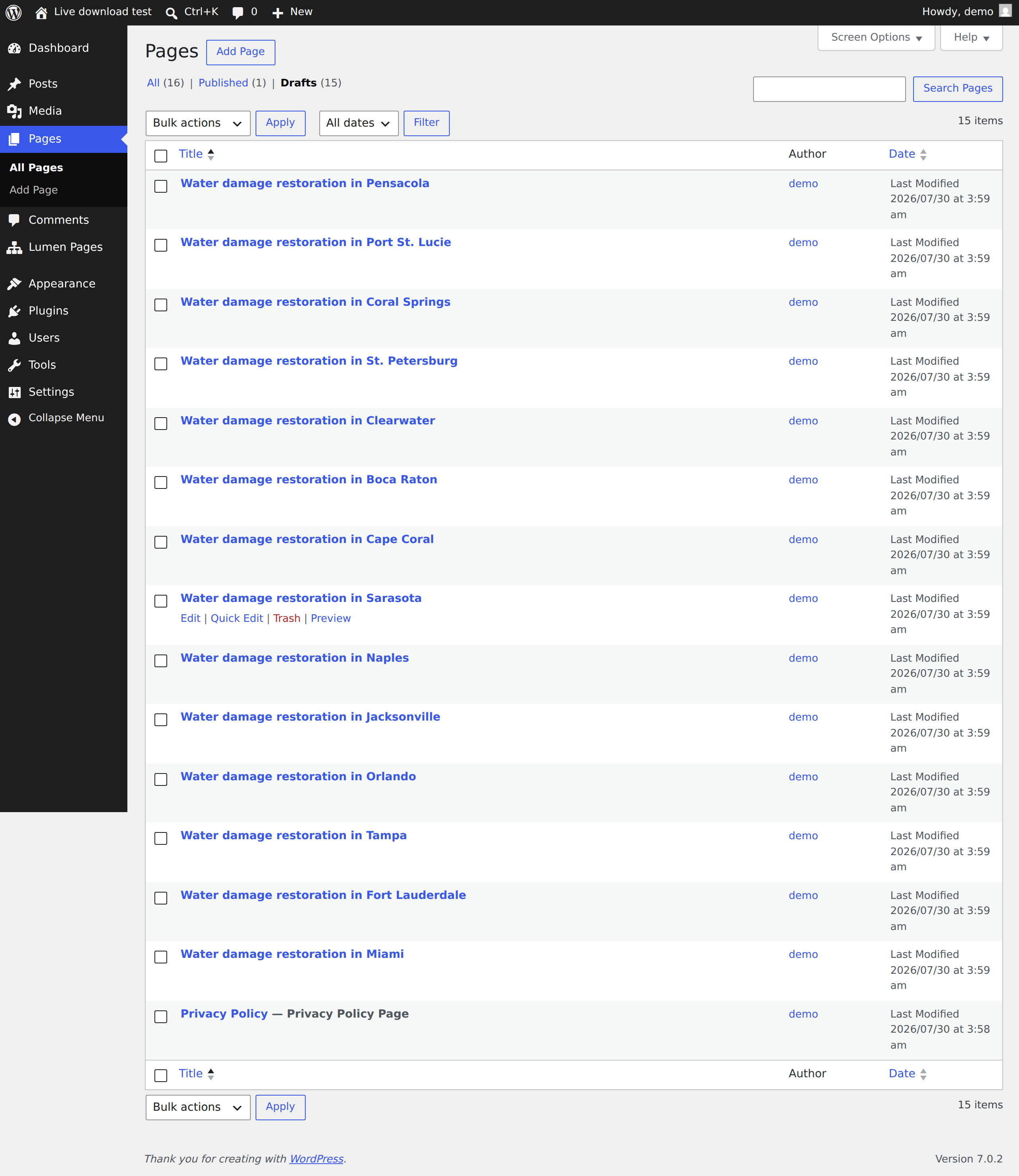
What the last version got wrong
Until today this page said nothing was for sale while the download still carried “Premium is $149/yr” in a code comment, a 10-page cap that only a licence key removed, and a “See Premium →” link back to this page — which says there is no checkout. Someone downloaded it, read line 24, and told me. They were right.
v1.0.1 removes all of it from the artifact, not just from this page. The build now fails if a price, a cap constant, a licence call or the word “Premium” reappears in the zip.
Where the idea came from
I run Restoration Answers, a local content network with 129 water-damage URLs in its sitemap — count them yourself. Doing that by hand is what made me write this plugin. It is a Next.js site, not WordPress, and those pages came from a different codebase of mine: it is the thing Lumen Pages is modelled on, not output Lumen Pages produced.
What I will not claim
No rankings, no traffic, no revenue. Lumen Pages has no users I know of and has never been sold to anyone. It saves you typing, and that is the whole of the pitch.
Editions
One edition of the plugin exists. It is free, and it is complete.
direct download, 45.5 KB zip — the WordPress.org submission has not been filed yet
- Included: Paste a term list plus a title/body template with {term} placeholders
- Included: One draft page or post per term, with no per-run limit — nothing publishes itself
- Included: Drops blank lines, collapses terms that would produce the same title, and skips a page that already exists; remembers your last template
- Included: All 1506 lines readable in a browser tab, with a published SHA-256 for the zip
- Included: No account, no licence key, no external calls — the zip contains no network code
- Included: GPL-2.0-or-later, licence text included in the zip
no price, no checkout, nothing to buy — and no date I can honestly give you
- Not built: Run-state memory proper — a record of which terms you have used, so you can see coverage and slice a list. 1.0.2 only avoids creating a page whose title already exists; it cannot tell you what you have done
- Not built: CSV / spreadsheet FILE upload with a column mapper. 1.1.0 shipped the substance of this — paste tab- or pipe-separated columns and name them — for free, because a warning about near-identical pages that offers no way to make them different is not a warning, it is an alibi. What is still unbuilt is the upload half: choosing a .csv from your machine and mapping its header row
- Not built: Scheduled publishing — drafts that go live on a date you set
Those three are the things a reader told me he would pay for, and all three are on the “Not built” list. There is still no paid edition of the plugin: no licence key, no cap, nothing that payment unlocks. What is now for sale is a separate pack of templates and term lists you paste into it. The plugin was not made worse to create room for it and does not know whether you bought it. An earlier version of this page showed $149/yr here, and the download repeated it in a comment. Nothing was ever sold at that price; it is gone from both.
Compared
Against the free plugin you would otherwise install.
Page Generator is the obvious comparison: 4,000+ active installs, 4.6/5 from 70 ratings, last updated 2026-06-29, version 1.8.6. It is free, it has auto-updates, and it does more than this does. Read the row that matters to you and pick accordingly.
| Lumen Pages 1.1.2 | Page Generator 1.8.6 (free) | |
|---|---|---|
| Pages per run | No cap | Free tier lets you set a limit; no hard cap documented |
| CSV / spreadsheet file upload | No — but you can paste spreadsheet columns as named {tokens} | No — listed under Pro Version |
| Meta description per page | Yes — a template, written to Yoast, Rank Math or SEOPress | Yes — in its own settings |
| Record of past runs | No — only skips a title that already exists | Yes — generated content can be listed, trashed or deleted |
| Auto-updates | No update channel at all | Yes — installed from WordPress.org |
| Network calls | None | WordPress.org update checks |
| Size you can audit | One PHP file, 1506 lines | A full plugin with a settings UI, keyword store and page-builder integrations |
| Creates | Drafts only, never publishes | Publish, draft or scheduled, your choice |
The right-hand column was read from the WordPress.org plugin API on 2026-07-30 and from that plugin’s own listing text — nothing in it is my characterisation of a competitor. Re-check it at https://wordpress.org/plugins/page-generator/. If auto-updates or a record of past runs matter to you, that is the better tool and it costs the same as this one: nothing.
Questions
Before you install anything.
What does it actually do?
You give it a title template, a body template and a list of terms. For each term it replaces {term}/{Term}/{TERM} and creates one WordPress draft page (or post). Since 1.1.0 a line can also carry named columns you paste from a spreadsheet, and you can optionally template the slug and the meta description. That is the whole plugin — 1.1.2 is 1506 lines of PHP with no dependencies.
Is there a limit on how many pages per run?
No. Version 1.0.0 stopped at 10 pages per run unless you had a licence key. That cap is gone in 1.0.1, along with the licence check itself. Every term you paste gets a draft. The only real ceiling is your host's PHP execution limit on a very long list. If a run gets cut short, run the same list again: since 1.0.2 a term whose page title already exists is skipped rather than duplicated, so a second run resumes instead of doubling up, and the screen tells you roughly how far the interrupted run got. In 1.0.0 and 1.0.1 that same advice would have created a second full set of duplicate drafts — the 10-page cap was quietly holding the damage down.
Does {Term} mangle names like McAllen — or acronyms like HVAC?
It did — twice, in two different ways, and both are fixed as of 1.0.3. In 1.0.0 and 1.0.1, {Term} ran every term through an unconditional Title Case, so McAllen came out “Mcallen”, DeLand “Deland”, McKinney “Mckinney”, LaGrange “Lagrange” and O’Fallon “O’fallon”, using the plugin's own default title template. 1.0.2 fixed that half: a word already in mixed case passes through untouched. But 1.0.2 still treated an ALL-CAPS word as carrying no case information and re-cased it, so HVAC repair became “Hvac Repair”, AC repair “Ac Repair”, BBQ catering “Bbq Catering”, SEO services “Seo Services” and US 1 corridor “Us 1 Corridor” — while the plugin's own admin screen sat there saying it never removes capitals. The person who found it had already checked the SHA-256 and diffed the published source against the zip byte for byte; the first list he ran it on was his own clients'. He was right, and the sentence in the box was wrong, which on a product whose only claimed edge is that you can read it and believe it is worse than a missing feature. 1.0.3 leaves an all-upper-case word of more than one character exactly as typed. The trade-off, stated because it is real: a term pasted as MIAMI now stays MIAMI rather than becoming Miami — MIAMI is also what you typed. What still cannot be recovered is a capital you never typed: mcallen becomes “Mcallen”, because nothing in the string says otherwise. Type each term the way you want it printed. Two things now stop this claim drifting again: the rule is defined once in the plugin file as LUMEN_PAGES_TERM_RULE and echoed by the admin screen rather than re-typed, and a fixture (apps/web/lib/lumen-pages-cases.json) pins 19 cases — miami, McAllen, DeLand, DeSoto, LaBelle, McKinney, LaGrange, O’Fallon, HVAC, AC, BBQ, SEO, US 1, MIAMI, mcallen and more — which are executed against the shipped file, not against a copy.
Will this get me penalised for spam?
It can, if you publish the raw output. Filling one template with a list of city names produces near-duplicate pages, and that is exactly the pattern search engines discount — Google calls them doorway pages, and its spam policies describe them at developers.google.com/search/docs/essentials/spam-policies#doorways. Two things in the plugin push against it: everything is created as a draft, so you cannot publish without opening each page, and terms that would produce the same title collapse to one page. Beyond that the plugin cannot help you, but here is the checklist used on the 91 metro pages at restorationanswers.com, which were built exactly this way — it is a description of a process, not a promise about rankings, and that site's traffic is small. Make at least these differ on every page: a cost or price range specific to that place with the source named; named local detail a resident would recognise (neighbourhoods, counties, ZIPs); one rule that genuinely varies by location, such as a permit requirement or a state insurance deadline; the meta description, written per page; and the opening paragraph, so the first thing a reader sees is not the same sentence with a swapped noun. Do not leave these identical: the H1 pattern with only the place name changed, a boilerplate hero, or an FAQ block repeated verbatim. If you cannot make a page meaningfully different from its neighbours, that page should not exist — deleting the draft is a legitimate outcome of a run. The same checklist is in readme.txt, so it is in the box and not only on this page.
Does it phone home?
The zip you can download here contains no network code at all — no licence check, no update check, no analytics. 1.0.0 did contain a licence verifier and a self-hosted update channel; both were removed in 1.0.1. You can read the whole file; it is 1506 lines.
How much time does it actually save, honestly?
The typing, and nothing else — which is less than it sounds and still worth having. Measured: a stranger who had never seen the screen went from the WordPress dashboard to five finished drafts in under two minutes, of which the run itself was 1.9 seconds; a 5,000-term list took about 20 seconds and produced 5,000 drafts. So the mechanical part — writing out titles, pasting a body, creating pages one at a time — collapses from an afternoon to a minute. What does not shrink at all is the part that decides whether the pages are worth publishing: finding a real cost range for each place and naming its source, finding the rule that genuinely differs there, writing an opening paragraph that is not the same sentence with a swapped noun, writing a meta description per page. Budget for that the way you would budget for writing one good page, and then multiply by the number of terms in your list. If that number is unaffordable, the honest move is a shorter list, not a faster generator. The columns feature in 1.1.0 exists to make that research reusable — do it once in a spreadsheet, paste the spreadsheet — but it cannot do the research.
What are the columns, and why not commas?
A term line can carry more than a term. Put the names in the Columns field — “price, landmark” — and separate the values with a tab or a pipe: Plano, TX | 1,900 to 6,400 | Legacy West. That gives you {price} and {landmark}, plus {Price} and {PRICE}, usable in the title, the body, the slug template and the meta description template. Not commas, because the terms this plugin exists for are place names and “Plano, TX” already contains one — splitting on commas would have broken the commonest input on day one. A tab is what you get for free when you copy a block of cells out of a spreadsheet, which is where these lists come from. Leave Columns empty and every line is a plain term, exactly as it was before 1.1.0. A row with fewer values than there are columns is not an error: the missing ones fill as blank, and the result message tells you how many rows that happened to.
Does it work with my theme?
It creates ordinary WordPress pages, so they render in your theme like any other page. There is no custom template, no shortcode and no page builder involved.
What do I do about updates?
Manually, and you have to come back here to find out one exists. There is no update channel of any kind: WordPress will never prompt you, no banner will appear on your Plugins screen, and the plugin cannot tell you a new version shipped because it makes no network call. That is deliberate — a self-hosted updater is one of the things that made v1.0.0 unfilable at WordPress.org — but the cost is real and it is yours to carry: bookmark this page and check it every few months, or watch the changelog at /plugin/versions. When you do update, download the new zip, delete the old plugin from your Plugins screen and upload the new one; your generated pages and your saved templates are untouched by that. If the directory listing ever happens, updates start arriving the normal way and this answer goes away.
Can I buy anything?
No. There is no checkout, no price, no licence key and no SKU. An earlier version of this page listed $149/yr and the zip repeated it — both were wrong and both are gone. The three items under “Planned” are what would have to exist before asking for money would be fair.
There are free plugins that do more than this. Why use it?
Quite possibly you shouldn't, and the table above this FAQ is there so you can decide without taking my word for it. Page Generator v1.8.6 has 4,000+ active installs, 4.6/5 from 70 ratings, was updated 2026-06-29, and arrives through WordPress.org with auto-updates — all of which Lumen Pages does not have. It also does more: it can list and delete what it generated, and it publishes on a schedule if you want. The one thing worth correcting, because it reads like a gap only this plugin has: CSV / spreadsheet import is not in that plugin's free tier either — the bullet sits under its own "Pro Version" heading. Since 1.1.0 this one takes pasted spreadsheet columns as named placeholders, which covers the merge-field half of that request for free; neither free tier will let you upload a .csv file. Lumen Pages is smaller on purpose: one file you can read end to end, drafts only, no network calls, no cap, no account. If auto-updates and a run history matter more to you than reading the code, take theirs — it is free too, and it is a better fit. Every figure here was read from the WordPress.org plugin API on 2026-07-30; the listing is at https://wordpress.org/plugins/page-generator/.
Updates
You already have the plugin. This is just for version 1.1.2+.
There is no auto-update channel — deliberately — so the only way you will hear about a new version is if I email you, and I will use this list for nothing else. Being straight about where that stands: no release email has ever been sent, including for 1.1.2. The form stored addresses before there was any code that could mail them; the sender exists now but has never been run against a real address. You can remove yourself here at any time without waiting for an email to arrive. If you would rather just check back, that works too — /plugin/lumen-pages.zip is a stable link that always serves the current version.
Found a bug, or want to tell me the plugin is too thin to be worth shipping? Both are useful — hello@lumenandink.com.